
Production-Readiness Checklist: 25 Things to Check Before You Launch
Is your app ready for real users? 25 checks across accounts, servers, security, backups, releases and monitoring, plus which ones to fix first if launch is days away.

The week before launch, founders usually ask me some version of the same question: "Are we ready?"
It's a fair question with an unfair answer. The app works. The demo looks great. But "works" and "ready for real users" aren't the same thing, and the gap between them only shows up once people start paying, signing up at 3am, and doing things nobody tested.
Below is the checklist I'd run before any launch: 25 checks in seven groups, which ones to fix first if you're short on time, and what usually goes wrong in launch week.
What does "production-ready" actually mean?
It means your app keeps working when things go wrong, not just when everything goes right.
A demo proves the happy path. Production is everything else: a hundred people signing up at once, a release that breaks checkout, a server that fails on a Sunday, a user who tries to read someone else's data. Google's SRE team found that roughly 70% of outages come from changes to a live system (Google SRE book), which is why launch week, when you're shipping fixes daily, is when most products wobble.
Ready doesn't mean perfect. It means you've thought about those moments before they happen, and someone knows what to do when they do.
The 25-point production-readiness checklist
Go through it with your developer or technical partner. Each item is a yes or a no. Don't count "probably" as a yes.
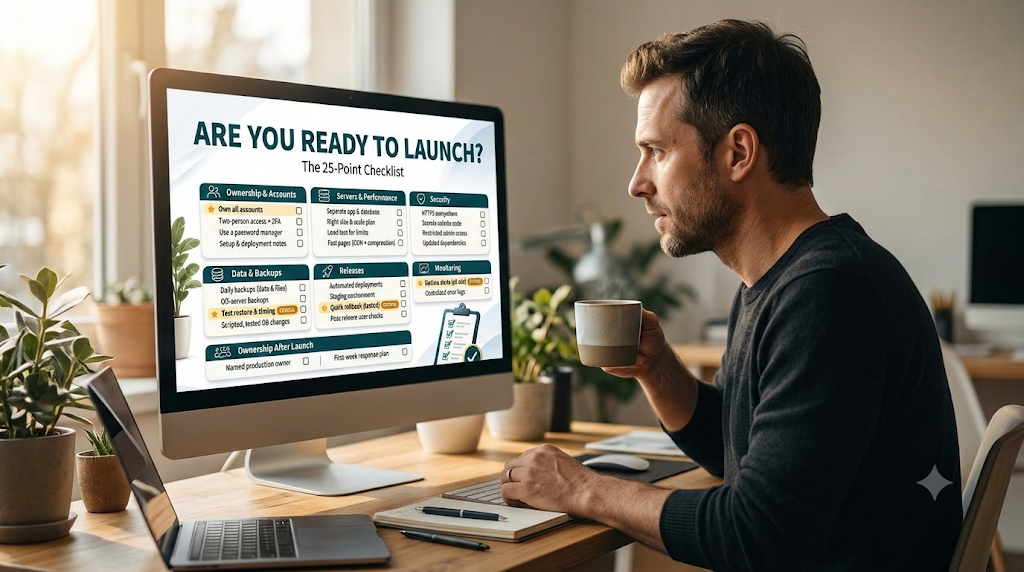
Ownership and accounts
- Your company owns the cloud account, the domain and the code repository. Not a freelancer, not an agency. If they disappear, you shouldn't lose access to your own product.
- At least two people can log in to everything that matters, with two-factor authentication on every account.
- Passwords and keys live in a password manager, not in chat messages, emails or a shared document.
- There's a short written note of how the app is set up: where it runs, what it depends on, and how to deploy it.
Servers and performance
- The app and the database run on separate machines (or the database is a managed service), so one can't starve the other of memory.
- Servers are sized for launch traffic, with room to grow, and you know what you'd change first if traffic doubled.
- Someone has tested what breaks first under load, especially if a launch post, campaign or press mention is planned (here's why sites crash during spikes).
- Pages load in a couple of seconds on a normal phone connection, with images compressed and static files served from a CDN.
Security
- HTTPS works everywhere, including the API and any admin pages, and certificates renew automatically.
- No secrets in the code. API keys and database passwords are stored as environment variables or in a secrets manager.
- Users can only see their own data. Test it: log in as one user and try to open another user's records or files.
- Admin access is limited to the people who need it, and every server login uses keys, not passwords.
- Dependencies are up to date, and the common gaps on the OWASP Top 10 have been checked.
Item 11 is the one I'd test myself. We built a platform for a compliance software company whose buyers manage chemical safety documents, and the first question in every sales call was about data: can another customer ever see our files? So each customer's data was fully separated, logins expired quickly and refreshed safely, secrets never lived in code, and every file link expired after a short time. None of that shows up in a demo. It's exactly what gets you through your first enterprise security questionnaire.
Data and backups
- The database is backed up daily, and uploaded files (images, documents) are backed up too, not just the database.
- Backups are stored somewhere other than the server they protect, ideally with another provider or in another region.
- Someone has restored a backup to a test copy and checked the data, and written down how long it took. A green tick isn't proof (more on that in snapshot vs backup).
- Database changes are scripted and tested on a copy first, so a release can't quietly corrupt live data.
Releases
- Releases are automated. Nobody copies files to a server by hand (our deployment walkthrough shows one way).
- There's a staging copy of the app where changes get tested before they reach customers.
- A bad release can be rolled back in minutes, and someone has actually tried it.
- After every release, someone checks the real user journeys (sign-up, login, payment), not just that the deploy pipeline went green.
Monitoring
- Uptime monitoring checks the site every minute or two and alerts a named person within five minutes, day or night.
- Errors are logged and tracked in one place, so you can see what broke and for whom.
Ownership after launch
- One person or team owns production, from the first alert to the final fix, including nights and weekends.
- There's a short plan for the first week: who watches the alerts, who can approve a rollback, and who talks to customers if something breaks.
Which checks matter most if you only have a few days?
Not all 25 carry the same risk. If launch is close and time is short, this is the order I'd work in:
| When | Checks | Why |
|---|---|---|
| Before launch, no exceptions | 1, 10, 11, 14, 15, 16, 20, 22, 24 | These are the ones you can't fix after the damage is done: lost access, leaked data, lost data, a release you can't undo, an outage nobody notices |
| In the first 30 days | 2, 3, 4, 5, 9, 12, 18, 19, 21, 23, 25 | They reduce risk every week you run without them |
| As you grow | 6, 7, 8, 13, 17 | Important, but the cost of waiting a few weeks is usually low |
If I had to pick three, they'd be the ones founders forget most often: a backup that's actually been restored, alerts that go to a real person, and a rollback someone has tried. Each takes a few hours. Each saves days.
Launching soon? A senior engineer will go through this checklist with you and send you the gaps in writing.
Get a free launch review →Free · Any cloud · No commitment
What usually goes wrong in launch week?
Rarely the thing you were worried about. The usual suspects are smaller and more boring:
- A hotfix pushed in a hurry breaks something else, and there's no quick way back.
- Sign-up emails land in spam because the email domain was never properly set up.
- A traffic spike from the launch post fills the database's connection limit.
- An alert fires at night and goes to a shared inbox nobody reads until morning.
- Someone asks for a refund or data export, and nobody knows how to do it safely.
None of these is hard to fix. They hurt because they arrive at the same time, during the week you most want things to go smoothly.
Building with Lovable, Cursor or Bolt? Check these twice
AI app builders are great at screens and features. They're much less reliable on the parts of this checklist nobody sees: access rules, secrets, backups and releases. When researchers scanned 1,645 apps built with Lovable, 170 let anyone access information about the site's users (Semafor).
If your app came from an AI builder, give items 10 to 16 extra attention. Log in as two different test users and try to see each other's data. Search the code for API keys. Find out where the database actually lives and whether anyone backs it up.
Who should own the checklist?
One named person, not "the team". A checklist everyone is responsible for is a checklist nobody finishes.
Before launch that's usually the lead developer or a technical founder. After launch it should be whoever owns production day to day, which is the gap I wrote about in who runs your app after launch. If you're not sure what that ownership covers, our plain-English guide to DevOps breaks it into six jobs.
How did you score?
| Your score | What it means |
|---|---|
| 22 to 25 | Ready. Launch, keep releases small and watch the alerts closely in week one |
| 15 to 21 | Close. Fix the "before launch" items in the table above first, then launch |
| Under 15 | Not ready yet. Launching now means finding the gaps through your customers |
Every "no" is a risk you'd be carrying into launch day. Most of them take hours, not weeks, once someone owns them.
Scored under 22? Go through your answers with a senior engineer before you launch.
Book my free production review →30 minutes · Free · The written review is yours to keep
Frequently asked questions
1. How do I know if my app is ready to launch?
When it can survive real users, a bad release and a lost server without you finding out from a customer. In practice: your company owns the accounts, backups have been restored, alerts reach a person, releases can be undone in minutes, and someone owns all of it.
2. What should be on a production-readiness checklist?
Ownership of accounts, right-sized servers, security basics, tested backups, safe releases, monitoring and a named owner. The 25 checks in this post cover all seven.
3. What do founders most often forget before launch?
Restoring a backup to prove it works, alerts that go to a real person, and a way to undo a bad release. All three take hours to set up and cost days when they're missing.
4. How long does it take to make an app production-ready?
For a typical startup app, a few days to two weeks of focused work, depending on how much is missing. Most items on the checklist are setup, not new features.
5. Do I need a staging environment before launch?
Yes, once real customers depend on the app. A staging copy lets you test releases and database changes somewhere that isn't your live product. It can be small and cheap.
6. What security checks should I do before launching?
HTTPS everywhere, no secrets in code, access limited to the people who need it, users only able to see their own data, and dependencies updated. The OWASP Top 10 is a good list of the common gaps.
7. Is an app built with Lovable or Cursor ready for production?
Sometimes, but rarely without checks. AI builders are good at screens and features. Access rules, backups, monitoring and releases are usually left to you. Start with the security and data sections of this checklist.
8. What should I monitor after launch?
Uptime, error rates, response times and the key user journeys like sign-up and checkout. Alerts should go to a named person, day and night, not just a dashboard nobody watches.
9. Should I load test before launch?
If you expect a spike (a launch post, a press mention, a paid campaign), yes. Even a simple test tells you what breaks first, so you can fix it before customers find it.
10. What happens if I launch without a rollback plan?
A bad release stays live while someone tries to fix it forward under pressure. With a tested rollback, the same mistake costs minutes instead of hours.
11. Who should own the launch checklist?
One named person or team, in writing. Usually the lead developer, a DevOps engineer or a technical partner. If nobody owns it, it quietly doesn't get done.
12. What should I do in the first week after launch?
Watch the alerts and error logs daily, restore one backup, check the cloud bill, and keep releases small. Most launch-week problems come from changes, so ship carefully.
Conclusion
Your app doesn't need to be perfect to launch. It needs to survive the first bad day: a broken release, a lost server, a curious user poking at someone else's data. These 25 checks are how you find out before your customers do.
Run through them with your developer this week. Fix the "before launch" items first. And give the whole list one owner, so launch day is the start of running your product, not the start of hoping.
Want one team to own your launch and everything after it?
Talk to an engineer →One contact for every layer, on your cloud or ours.