
Is Your AI-Built App Ready for Real Users? A Guide for Lovable, Bolt and Cursor Founders
AI app builders are great at screens and features. Access rules, secrets, backups, monitoring and releases are usually left to you. What to check before real users arrive, and when to harden versus rebuild.

You built your app over two weekends with an AI app builder. It looks good. Sign-up works, payments work, the dashboard is clean. Maybe you've already shown it to a few investors.
Here's the test I'd run before anyone else sees it. Log in as one test user, open a record, and change one number in the address bar. If you're now looking at someone else's account, you're not alone, and it's fixable. But it's exactly the kind of thing a demo never shows.
The tool built what you asked for. It just didn't build the parts nobody asks for in a demo.
This guide covers what AI builders handle and what they don't, why AI-built apps break once real users arrive, how to check yours in an afternoon, and when to harden it versus rebuild it.
What do AI app builders actually handle, and what do they leave to you?
They handle the visible part brilliantly. Turning a description into working screens, forms and flows in hours used to take a team weeks. That's real, and it's why so many good products now start this way.
What they don't handle is everything that only matters once strangers use your app:
| Area | What the builder usually handles | What's usually left to you |
|---|---|---|
| Screens and features | Pages, forms, flows, styling | Edge cases and error states |
| Data and access | A database and a login | Rules that stop users seeing each other's data |
| Secrets | Connecting to services | Keeping API keys out of the browser and the repository |
| Backups | Sometimes a basic copy | Backups you control, stored elsewhere, actually restored |
| Releases | Publishing the latest version | A staging copy, testing and a quick way back |
| Monitoring | Little or nothing | Alerts to a person when it breaks |
| Cost | Hosting on its own plan | Limits on paid AI and API calls as usage grows |
| Ownership | Nothing | Someone responsible when it goes wrong |
None of this is a criticism of the tools. It's just not what they're for. The mistake is assuming that because the app works, these parts must be there too.
Why do AI-built apps break once real users arrive?
Because a demo has one user doing the expected thing, and production doesn't.
The numbers are getting hard to ignore. When researchers scanned 1,645 apps built with Lovable, 170 let anyone access information about the site's users (Semafor). In February 2026, a security researcher found 16 flaws in a single Lovable-hosted app, including missing row-level security and a login check with its logic reversed, exposing 18,697 user records (The Register). And across more than 100 AI models, Veracode found that generated code introduced a security flaw in 45% of the tasks it tested (Veracode).
The problems I see most often, roughly in order:
- Missing data rules. The database has no row-level security, or rules so loose that any logged-in user can read every row.
- Secrets in the front end. API keys for payments, email or AI services sitting in code the browser downloads.
- No real backups. The data lives in a service nobody has looked at, and nobody knows if it can be restored.
- Releases straight to live. Every prompt-driven change goes to customers immediately, with no staging and no undo.
- No monitoring. The app breaks at night and the founder finds out from a user email in the morning.
- Runaway costs. Every click calls a paid AI API, and the bill grows faster than the revenue.
- Code nobody understands. It works, but nobody can safely change it, so every fix risks breaking something else.
"It works in the demo" is where the real work starts
We see this on our own projects too, even when the app is built properly. We built an AI phone receptionist for a US real estate brokerage, and it worked on day one. Calls were answered, leads were captured, the demo was perfect.
Production found the gap later. The voice provider's recording links expired after a while, so the brokerage was quietly losing call history it needed. Nothing had crashed. No alert fired. The data just wasn't where everyone assumed it was. We moved the recordings to permanent storage and served them through short-lived signed links, so nothing gets lost and the files stay private.
That's what production is like with AI products. The failures aren't loud. They're slow, quiet gaps between what the demo did and what the business actually needs.
How do you check if your AI-built app is ready? An afternoon test
You don't need to read the code to find the biggest risks. Ask your developer, or do these yourself with two test accounts:
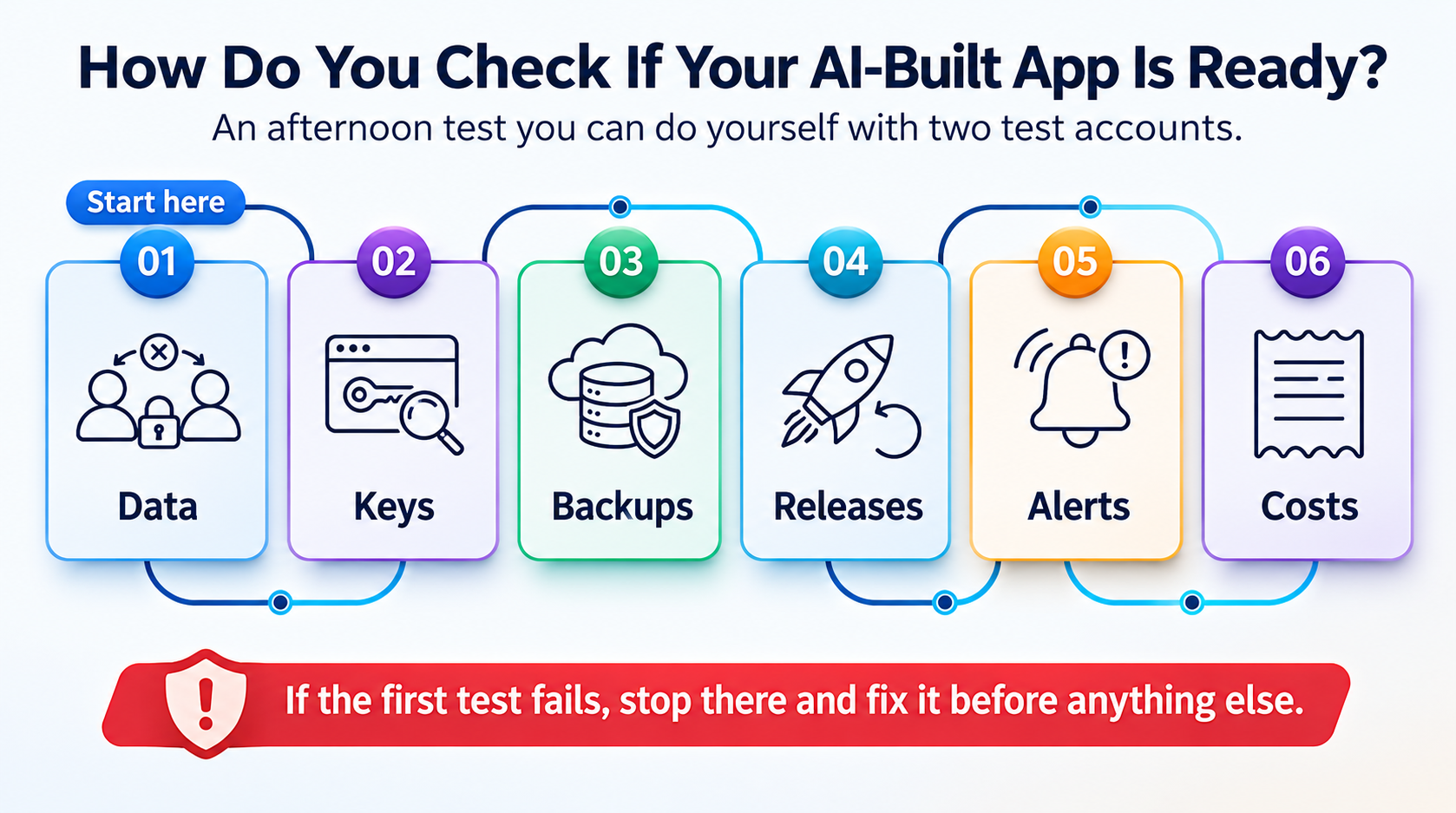
- Try to see someone else's data. Log in as test user A, open one of their records and copy the address. Log in as user B and paste it. If it opens, your access rules are broken. Try the same with uploaded files.
- Look for keys in the browser. Open your app, right-click, choose "View page source" or the browser's developer tools, and search for words like "key", "secret" or "sk_". Anything that looks like a password shouldn't be there.
- Find out where the data lives. Which database, whose account, and is it backed up somewhere you control? Then restore one backup to a test copy (here's how to test a backup restore in 15 minutes).
- Check what happens when you change something. Is there a test copy of the app, or does every change go straight to customers? Can a bad change be undone in minutes?
- Turn on alerts. Set up a free uptime check that emails or messages a real person when the site goes down.
- Look at the bill. Which services charge per use, especially AI calls? Is there a spending limit or a billing alert on each?
If the first test fails, stop there and fix it before anything else. Everything else on this list costs you time. That one can cost you your customers' trust.
For the full launch list, our 25-point production-readiness checklist covers everything else, from accounts to monitoring.
Built your app with Lovable, Bolt, Cursor or Replit? A senior engineer will review it for real users and send you the gaps in writing.
Get a free AI-built app review →Free · Any builder · No commitment
Should you harden your AI-built app or rebuild it?
Harden it, most of the time. Founders often assume an AI-built app has to be thrown away and rebuilt "properly" before launch. In my experience that's rarely true, and it's an expensive way to lose months.
| Harden it when | Rebuild it when |
|---|---|
| The data model makes sense (users, accounts, orders are stored sensibly) | The data model is wrong and every new feature fights it |
| Security gaps are missing rules and misplaced keys, not the whole design | Access control is mixed into every screen and can't be fixed in one place |
| A developer can read the code and change it safely after a cleanup | Nobody can change anything without breaking something else |
| You need to launch in weeks, not months | You've outgrown the builder's platform limits for good |
A good developer can usually tell you which side you're on after a day or two with the code. Ask for that review before anyone quotes you a rebuild.
What does hardening an AI-built app involve?
It's a sequence, not a rewrite. For a typical MVP it takes one to three weeks, in roughly this order:
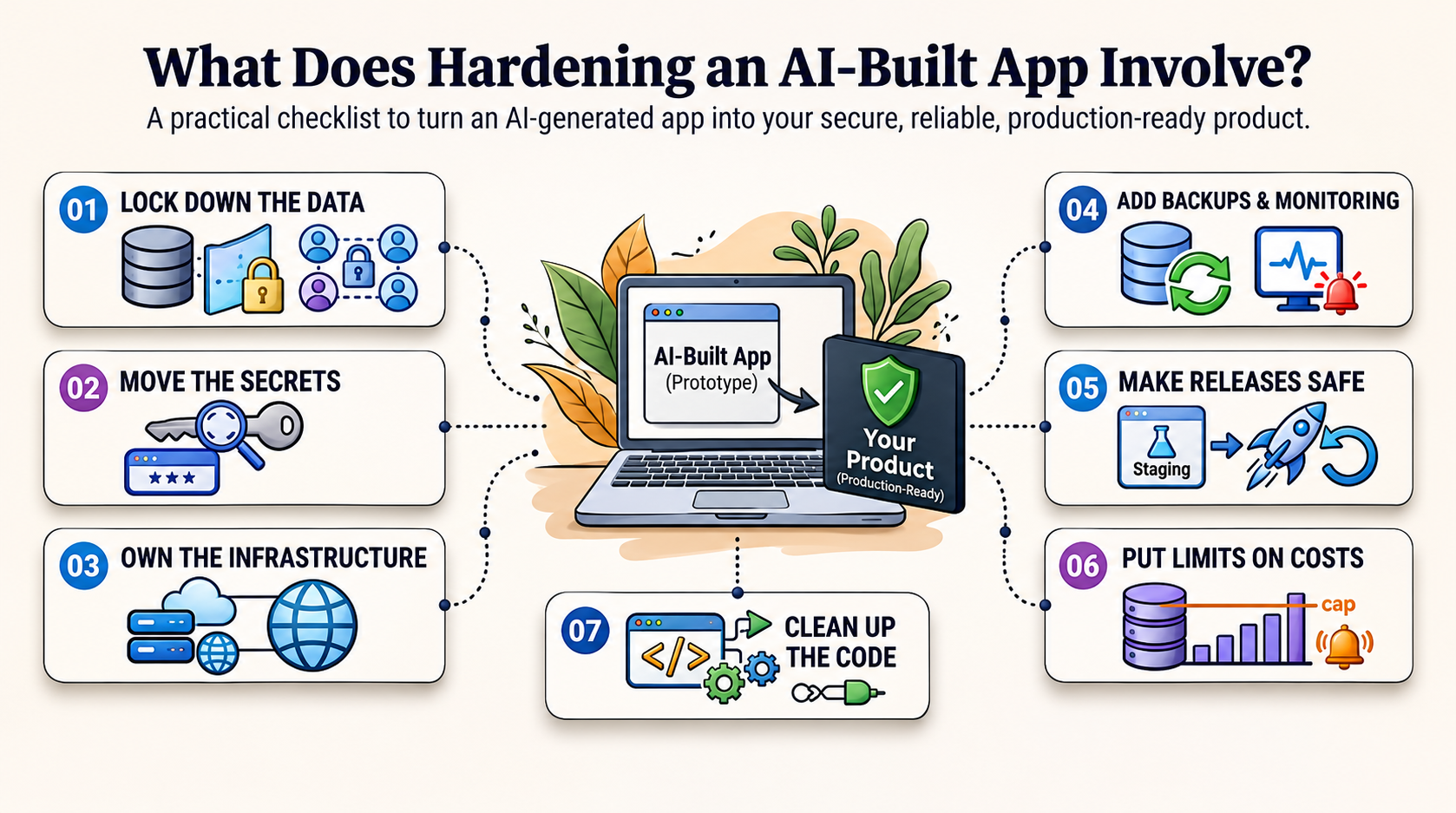
- Lock down the data. Add or fix row-level security and access checks, test them with two users, and protect uploaded files the same way.
- Move the secrets. Take keys out of the front end and the repository, store them properly, and rotate any that were exposed.
- Own the infrastructure. Make sure the database, hosting and domain sit in accounts your company controls.
- Add backups and monitoring. Daily backups you've restored once, uptime and error alerts to a named person.
- Make releases safe. A staging copy, a simple pipeline and a rollback that's been tried.
- Put limits on costs. Spending caps and alerts on AI and API usage, and cheaper paths for calls that don't need a model.
- Clean up the code that matters. Not everything. Just the parts that handle money, data and logins, so a developer can change them with confidence.
After that, the app isn't "AI-built" anymore in any way that matters to your customers. It's just your product, and it's ready for them.
Who should own an AI-built app after launch?
Someone has to, and the builder won't. It hosts your code, but it doesn't watch your app, answer at 2am or fix a production problem in your data.
Before launch that's usually you or the developer who helped you finish it. Once real customers depend on it, you need a named owner for the servers, the releases and the fixes. That's the gap I wrote about in who runs your app after launch, and it matters even more when the code was written by a tool nobody can call.
Is your AI-built app ready? Five quick questions
- Have you tested that one user can't open another user's records or files?
- Are all API keys and passwords out of the front end and the code repository?
- Is the database in an account your company owns, with a backup someone has restored?
- Is there a way to test changes and undo a bad one before customers see it?
- Will a real person get an alert if the app goes down tonight?
Each "no" is a risk you'd be launching with. The first one is the one to fix today.
Answered "no" to any of these? Go through your app with a senior engineer before real users find the gaps.
Book my free production review →30 minutes · Free · The written review is yours to keep
Frequently asked questions
1. Is my Lovable app production-ready?
Not automatically. Lovable is good at building screens and features fast, but access rules, backups, monitoring, releases and cost control are usually left to you. Check that users can only see their own data, that no keys sit in the front end, and that someone has restored a backup before real users arrive.
2. Are apps built with AI tools secure?
They can be, but they often aren't out of the box. Veracode found that AI-generated code introduced a security flaw in about 45% of the tasks it tested. The most common gaps in AI-built apps are missing database access rules and secrets left in the code.
3. What is row-level security, and why does it matter?
It's the rule in your database that decides which rows each user can see. In Supabase-backed apps it's often missing or too loose, which means one logged-in user, or even a stranger, can read everyone's data.
4. Can I launch an MVP built with Bolt or Lovable?
Yes, if you check it first. Many founders do. The safe path is to launch with a small group, fix the security and data checks in this guide before opening it up, and have someone own the app once it's live.
5. Should I rebuild my AI-built app from scratch?
Usually not. Most AI-built apps can be hardened: access rules tightened, secrets moved, backups and monitoring added, code cleaned up where it matters. Rebuild only if the data model is wrong or nobody can safely change the code anymore.
6. Why does my AI-built app work in the demo but break with real users?
A demo has one user doing the expected thing. Real users arrive at the same time, try unexpected paths, and look at each other's data. AI builders optimise for the demo, so the problems show up later.
7. What does an AI app builder not handle for me?
Usually: database access rules, backups you control, monitoring and alerts, safe releases with a rollback, cost limits on AI and API calls, and someone responsible when something breaks.
8. How do I check if other users can see my users' data?
Create two test accounts. Log in as the first, note the address of one of its records or files, then log in as the second and try to open it. If it opens, your access rules are broken.
9. Do AI-built apps cost more to run?
They can, especially if every action calls a paid AI API. Set usage limits and billing alerts from day one, and check which calls actually need an AI model and which could be plain code.
10. Can a developer take over an app built with Cursor or Replit?
Yes. The first job is a review: how it's structured, where the data lives, what's exposed, and what's missing. Expect a few days of cleanup before new features.
11. Who owns an AI-built app after launch?
You do, unless you name someone. The builder hosts the code but doesn't watch your app, answer at 2am or fix production problems. That's a job for a developer, a DevOps engineer or a technical partner.
12. How long does it take to make an AI-built app production-ready?
For a typical MVP, one to three weeks of focused work, depending on how much is missing. Security and data checks come first, then backups and monitoring, then releases.
Conclusion
AI app builders have changed how products start. They haven't changed what it takes to run one. The screens are the easy part now. The data rules, the secrets, the backups, the releases and the 2am alerts are still yours.
Run the afternoon test this week, starting with the two-account check. Harden before you rebuild. And give your app an owner before your customers become your monitoring system.
Want one team to take your AI-built app from demo to production, and own it after?
Talk to an engineer →One contact for every layer, on your cloud or ours.