
How to Read Your AWS Bill in 10 Minutes (and Spot the Waste)
You don't need to be an engineer to read your AWS bill. Ten minutes, two screens and a short list of usual suspects: where the money goes, what to fix first, and how to stop the next surprise.

Plenty of founders I talk to have never looked past the total on their AWS bill. It arrives, it's a bit higher than last month, somebody pays it, and everyone gets back to work.
Then one month it's a lot higher, and nobody can explain why.
You don't need to be an engineer to read it. You need ten minutes, two screens in the AWS console, and a short list of the usual suspects.
Where do you find your AWS bill?
Sign in to the AWS console and search for Billing and Cost Management. Two screens matter:
- Bills: the official monthly bill, broken down by service and region. Good for seeing what you were charged.
- Cost Explorer: charts of your costs over time that you can group and filter. Good for working out why. It's free to use in the console (AWS).
If you can't see these pages, your login probably doesn't have billing access. Ask whoever set up the account to give you read-only billing access. And if that person is a freelancer who no longer works with you, fixing that is your first job.
How to read your AWS bill in 10 minutes
Five steps, roughly in this order:
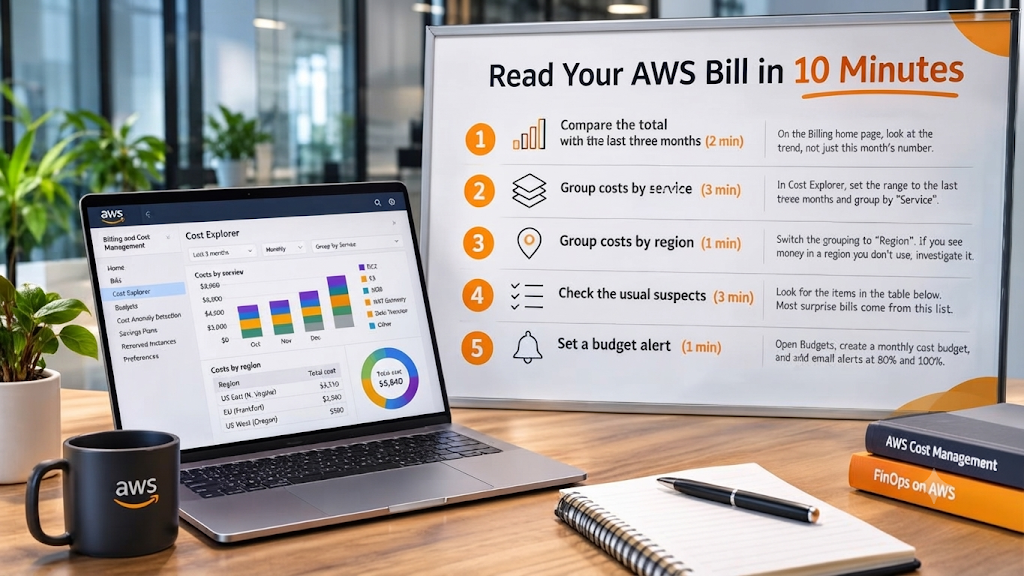
- Compare the total with the last three months (2 minutes). On the Billing home page, look at the trend, not just this month's number. A steady climb with flat traffic is the first sign of waste.
- Group costs by service (3 minutes). In Cost Explorer, set the range to the last three months and group by "Service". The top three or four services are usually most of the bill. Note anything you don't recognise.
- Group costs by region (1 minute). Switch the grouping to "Region". If you see money in a region you don't use, something was created there and forgotten.
- Check the usual suspects (3 minutes). Look for the items in the table below. Most surprise bills come from this list.
- Set a budget alert (1 minute). Open Budgets, create a monthly cost budget a little above your normal bill, and add email alerts at 80% and 100%. Basic budget monitoring is free (AWS Budgets pricing).
That's it. If something looks off after these five steps, you'll know exactly which service to ask your developer about, instead of asking why the bill is high in general.
What are the usual suspects on an AWS bill?
These are the lines I look at first, because they grow quietly and nobody owns them:
| Line on the bill | What it is | Why it grows | What to check |
|---|---|---|---|
| EC2 | Your servers | Oversized or idle machines left running | Average CPU use; anything that's been idle for weeks |
| EBS volumes and snapshots | Disks and disk copies | Old snapshots and detached disks keep charging | Snapshots older than your backup plan needs |
| NAT gateway | Lets private servers reach the internet | About $0.045 an hour (around $33 a month) before any data, plus a charge per GB | How many you have and how much data goes through them |
| Data transfer | Data leaving AWS or crossing zones | Images, video, backups and chatty services | Which service is sending the data |
| Public IPv4 addresses | Public IPs on servers and load balancers | $0.005 an hour each since February 2024, in use or not | Unattached Elastic IPs and servers that don't need one |
| RDS | Managed databases | Oversized instances, extra copies, long backup retention | Size versus real use; test databases left running |
| CloudWatch | Logs and metrics | Logs kept forever | How long logs are kept and what's being logged |
Sources for the two odd ones: AWS's own announcement of the public IPv4 charge, and a breakdown of NAT gateway pricing. Prices vary by region, so check yours.
The NAT gateway is the one that surprises people most. It's often created automatically by a template or a tutorial, it charges every hour whether anything uses it or not, and then it charges again for every gigabyte that passes through. On a small setup it can easily become one of the biggest lines on the bill.
Not sure what half the lines on your AWS bill are? A senior engineer will go through it with you and send you the findings in writing.
Get a free cloud cost review →Free · Any cloud · No commitment
Why is my AWS bill so high?
Almost never because the app suddenly got expensive. Usually it's one of three things.
Things nobody switched off. A test server from a demo, a database copy from a migration, snapshots from a server that no longer exists. Each is small. Together they're a real number. Flexera's 2026 State of the Cloud report found 29% of cloud spend is wasted (iTWire), and at startup size most of it looks like this.
Things sized for a company you're not yet. A database picked "to be safe", three availability zones for an app with a few hundred users, a cluster where one server would do.
Things nobody is watching. If no one gets an alert when the bill jumps, the first person to notice is whoever pays it, weeks later.
This is also why budget alerts matter more than any single fix. A software company asked us to audit their Google Cloud setup end to end: compute, storage, networking and the bill. Different cloud, same lesson. Alongside the security, monitoring and pipeline work, one part of that job applies to every founder: cost alerts on the account, so the bill can't drift for months unseen.
What should you fix first?
| Fix now (minutes) | Plan it (days) |
|---|---|
| Delete idle servers, unattached disks and unused Elastic IPs | Right-size servers and databases to real usage |
| Delete snapshots older than your backup plan needs | Reduce NAT gateway traffic, or remove gateways you don't need |
| Set log retention instead of "keep forever" | Use savings plans for steady, predictable workloads |
| Set a budget alert at 80% and 100% | Decide whether AWS is the right platform at your size |
Do the left column this week. Most founders find something there on the first pass.
When the bill says you're on the wrong platform
Sometimes the waste isn't one line. It's the whole setup. A startup came to us mid-fundraise with a problem I see often: their AWS bill was too big for a product that was still mostly being demoed. The founders had already decided a simpler server was the answer, and the job was finishing that move safely, with everything tested on the new machine before AWS was switched off.
AWS is excellent when you need what only AWS offers. If you don't yet, it's worth asking whether a simpler setup would do the same job for less. We compared real numbers in how much hosting should cost for an MVP.
Who should read the bill every month?
One named person. Not "whoever has time".
Cost is one of the six jobs in our plain-English guide to DevOps, and it's the one that goes missing first, because nothing breaks when it's ignored. The bill just grows. If you don't have someone who owns your infrastructure day to day, that's the gap I wrote about in who runs your app after launch.
Is your AWS bill under control? Five quick questions
- Do you know your last three months' totals and which way they're going?
- Can you name the top three services on your bill?
- Is there a budget alert on the account?
- Has anyone checked for idle servers, old snapshots and unused IPs in the last 90 days?
- Is one named person responsible for the bill?
Each "no" is money you're probably spending without meaning to. Each takes minutes to fix once someone owns it.
Answered "no" to any of these? Go through your bill with a senior engineer.
Book my free production review →30 minutes · Free · The written review is yours to keep
Frequently asked questions
1. How do I read my AWS bill?
Open Billing and Cost Management in the AWS console. Compare this month's total with the last three, then open Cost Explorer and group costs by service and by region. That shows you where the money goes in a few minutes.
2. Why is my AWS bill so high?
Usually because of things nobody switched off or right-sized: idle or oversized servers, old snapshots, NAT gateways, data transfer, public IP addresses and log storage. Most of it isn't the app itself.
3. What is AWS Cost Explorer?
A free tool in the AWS console that shows your costs over time and lets you group them by service, region, account or tag. Using it in the console costs nothing; only its API calls are charged.
4. How do I set up a budget alert on AWS?
In Billing and Cost Management, open Budgets, create a monthly cost budget, and add email alerts at 80% and 100% of the amount. It takes a couple of minutes, and basic budget monitoring is free.
5. What is a NAT gateway, and why does it cost so much?
It lets private servers reach the internet. AWS charges for every hour it runs (about $33 a month in the main US regions) plus every gigabyte that passes through it, so busy apps can pay far more than expected.
6. Does AWS charge for public IP addresses?
Yes. Since February 2024, AWS charges $0.005 an hour for every public IPv4 address, whether it's in use or not. That's about $3.65 a month each, which adds up across servers and load balancers.
7. What are EBS snapshots, and should I delete old ones?
They're copies of your server disks. They're useful as backups, but they're charged for as long as they exist. Keep the ones your backup plan needs and delete the rest on a schedule.
8. Why do I have AWS charges in a region I don't use?
Usually something was created there by accident or for a test and never removed. Group your costs by region in Cost Explorer, then check and delete what you don't need.
9. How often should I review my AWS bill?
Once a month for most startups, plus a budget alert so you hear about sudden jumps in days, not weeks. A monthly review takes about 10 minutes.
10. How can a startup reduce its AWS bill?
Switch off what nobody uses, right-size oversized servers, clean up old snapshots and unused IPs, check data transfer and NAT costs, and consider savings plans for steady workloads. Then set a budget alert so it stays down.
11. Should I move off AWS to save money?
Sometimes. If you're paying big-cloud prices for a small, simple product, a simpler setup can cost far less. But fix the waste first: it's often enough on its own.
12. Who should own the AWS bill?
One named person, usually the founder or whoever owns the infrastructure. If everyone can create resources and nobody reviews the bill, it drifts up every month.
Conclusion
Your AWS bill isn't as complicated as it looks. Most of it comes down to a handful of services, and most surprises come from the same short list: idle servers, old snapshots, NAT gateways, data transfer, public IPs and logs.
Take ten minutes this week. Compare three months, group by service and region, check the usual suspects, and set a budget alert. Then give the bill one owner, so next month's number isn't a surprise.
Want one team to own your servers, deployments and cloud bill?
Talk to an engineer →One contact for every layer, on your cloud or ours.