
The Founder's Guide to Running a Product in Production
Running a product in production takes five things working together, and most outages happen in the gaps between them. What each one means, what it costs when nobody owns the fix, and a 10-question self-check.

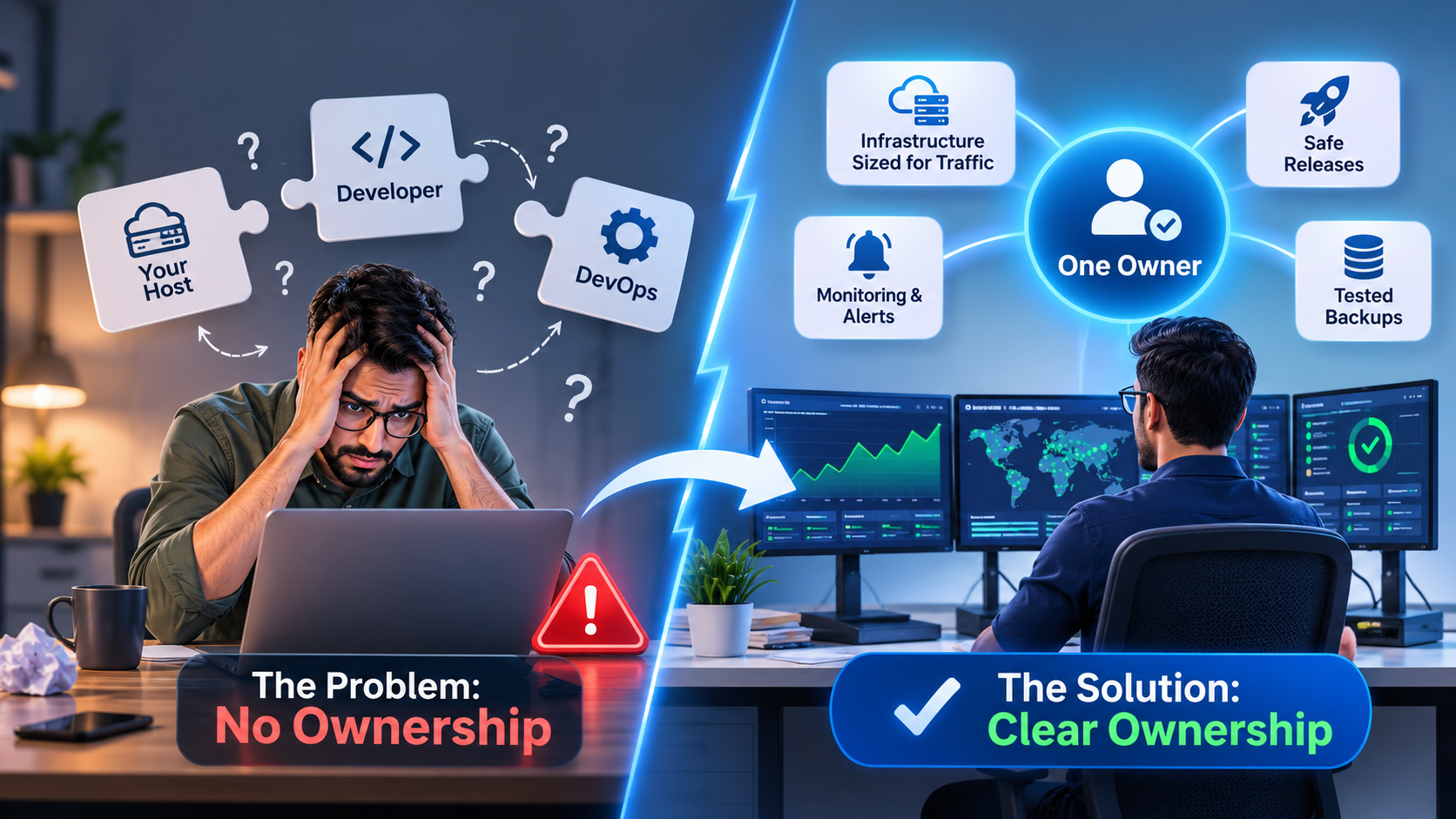
• Running a product in production takes five things: right-sized infrastructure, safe releases, alerts that reach a person, tested backups and one owner.
• Most outages happen in the gaps between vendors, not inside any single one of them.
• About 70% of outages start with a change to the live system, so safe releases matter more than a faster server.
• The fix is ownership: one named person or team accountable from the first alert to the final fix.
Short answer: running a product in production means keeping it fast, safe and available for real customers every hour of every day. That takes five things working together: infrastructure sized for your traffic, safe releases, monitoring that alerts a person, backups you have tested, and one team that owns every fix. Most outages happen in the gaps between them.
It's 2am and your checkout has stopped working. Your host says the server is fine. Your developer says nothing changed. Your DevOps freelancer is asleep in another time zone. And you're in a group chat at midnight, trying to work out whose job it is.
I've spent more than twelve years as a DevOps and cloud engineer, and this is the pattern I see most. It isn't a hard technical problem. It's a simple problem that nobody owns. This guide covers what running in production really involves, where it usually breaks, what that costs, and how to decide who should own it.
What does "running in production" actually mean?
Production is the version of your product that real customers use, with real money and real data. Running it means keeping that version available, fast and secure, and fixing it quickly when something goes wrong, at any hour of the day or night, including weekends and holidays.
Building a product and running it are two different jobs. Building ends when a feature ships. Running never ends. Traffic grows, dependencies need updates, security certificates expire, disks fill up, and every release can break something that worked perfectly yesterday.
Most founders plan carefully for the build and barely at all for the run. But the run is where customers judge you. Nobody remembers how elegant your code was. They remember the day checkout failed and nobody answered their email.
👉 What this means for you: budget time and money for running the product, not just building it. If nobody owns the run, it will eventually run you.
What are the five things every live product needs?
Every live product needs the same five things, whatever it's built with: infrastructure sized for your traffic, safe releases, monitoring that alerts a person, backups you have tested, and one owner for every fix. Miss one, and the other four can't save you when something breaks.
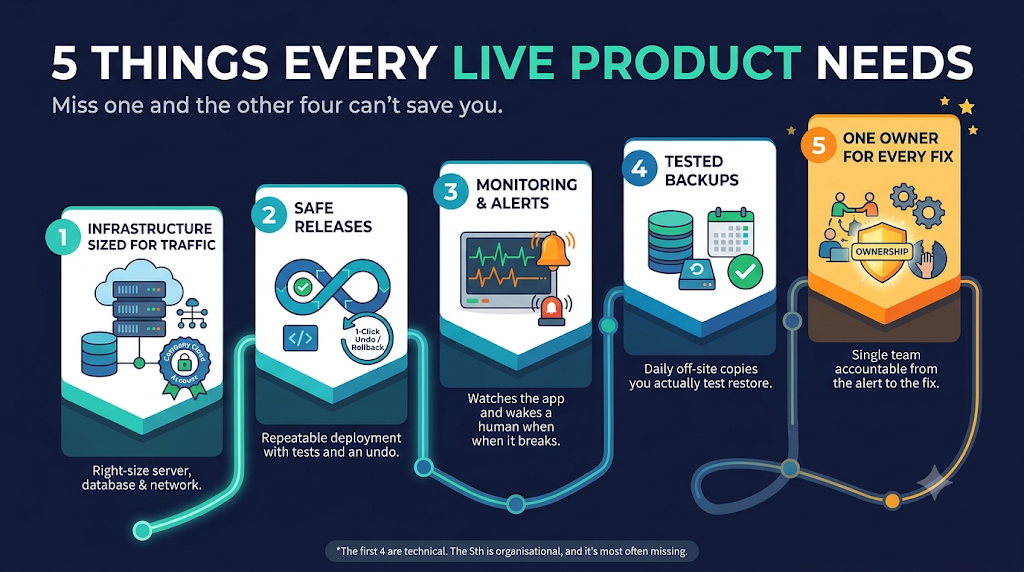
| The need | What it is | What breaks without it | The minimum you need |
|---|---|---|---|
| 1. Right-sized infrastructure | Servers, database and network that match how many people use your product | The app slows down or falls over when traffic grows | A separate app and database, room to grow, and a cloud account your company owns |
| 2. Safe releases | A repeatable way to ship code, with a way back | A bad update takes the site down and nobody can undo it quickly | Automated deployments (CI/CD) and a rollback you have tested |
| 3. Alerts to a person | Something watches your app and wakes a human when it breaks | Customers find the outage before you do | Uptime and error alerts going to a named person, day and night |
| 4. Tested backups | Copies of your data that you have actually restored | Data loss becomes permanent | Daily backups kept away from the server, with a monthly restore test |
| 5. One owner | One person or team accountable from the alert to the fix | Each vendor fixes only their part, and the gaps stay broken | A named contact with authority over servers, deployments and code |
If you want the detail behind each one, we have separate guides on
setting up a safe deployment, why a snapshot is not a backup and why websites crash during traffic spikes.
👉 What this means for you: the first four are technical, and most teams get them roughly right. The fifth is organisational, and it's the one most often missing.
What does good production look like in a small startup?
Good production is boring. In a well-run five-person startup, nothing dramatic happens, because the five things are quietly doing their jobs. A normal month looks something like this:
- Every release goes out through an automated pipeline in minutes, and nobody logs into a server by hand.
- One bad release a month is caught by an alert and rolled back in two minutes, before most customers notice.
- The cloud bill is checked once a month, and a forgotten test server gets switched off.
- A backup is restored to a test environment, and someone confirms the data is all there.
- The founder spends the month on customers and sales, not in group chats about outages.
👉 What this means for you: you don't need a big team or expensive tools to get here. You need the five things in place and one person whose job it is to keep them there.
Why do outages happen between vendors, not inside them?
Most outages that hurt small companies don't come from one vendor failing. They come from a problem that sits between two vendors, where each one can honestly say "that's not ours". A typical early-stage setup has three parties, and none of them owns the whole system:
- The host keeps the server switched on. Your code, configuration and deployments are outside their scope, and their terms say so.
- The developer or agency wrote the code. They may have moved to another project, or their contract ended at launch.
- The DevOps freelancer set up the pipeline last year. They're in another time zone and charge by the hour.
Why do outages happen between vendors, not inside them?
Most outages that hurt small companies don't come from one vendor failing. They come from a problem that sits between two vendors, where each one can honestly say "that's not ours". A typical early-stage setup has three parties, and none of them owns the whole system:
- The host keeps the server switched on. Your code, configuration and deployments are outside their scope, and their terms say so.
- The developer or agency wrote the code. They may have moved to another project, or their contract ended at launch.
- The DevOps freelancer set up the pipeline last year. They're in another time zone and charge by the hour.
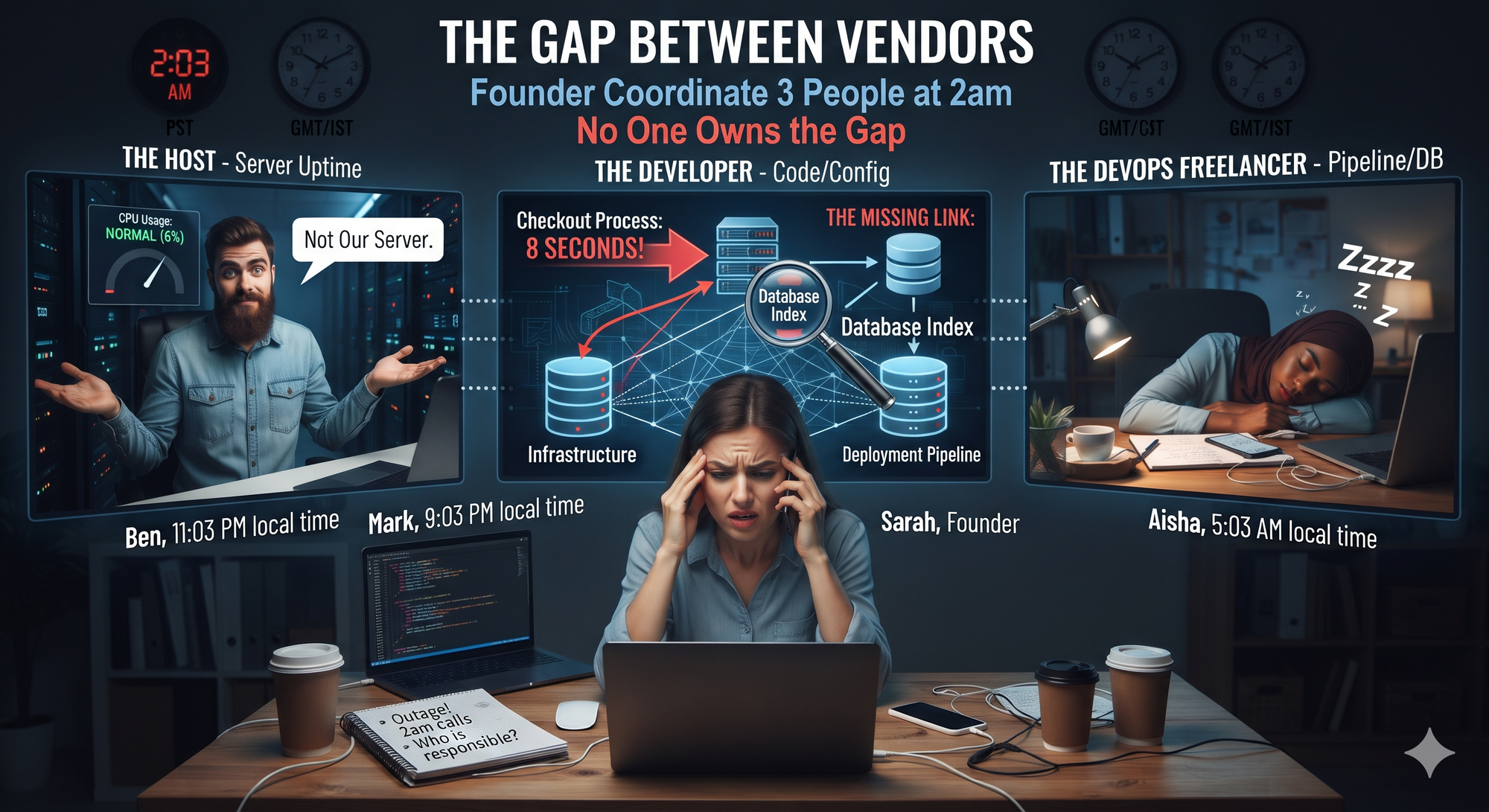
👉 What this means for you: "who do I call?" matters more than "which cloud should I use?". A cheaper or faster cloud doesn't fix a gap in ownership. If you're unsure what that ownership covers, our plain-English guide to DevOps breaks it into six jobs.
What does it cost when nobody owns the fix?
The cost of an outage is rarely just the sales lost during the downtime. It's the hours spent finding someone to fix it, the customers who quietly leave, and the growth you put off because you no longer trust the setup. You can estimate your own number in a few minutes:
- Lost revenue: your average revenue per hour, multiplied by the hours you were down.
- Recovery time: the hours you and your team spent coordinating and fixing, multiplied by what your time is worth.
- Lost customers: the customers who cancelled or never came back, multiplied by what each is worth to you over a year.
- Delayed growth: launches, campaigns or sales calls you postponed because the product didn't feel safe.
👉 What this means for you: work out your number once. Most founders find that one bad outage costs more than a year of proper ownership.
Not sure where your setup is leaking time or money? A senior engineer will review your servers, deployments and cloud bill, and send you the findings in writing.
Get a free infrastructure review →Free · Any cloud · No commitment
Who should own production: you, a hire, freelancers or a partner?
There are four realistic ways to own production, and the right one depends on your stage. Your budget matters, but so does how much downtime your customers will forgive. Here's how the options compare for a startup with a live product:
| Option | Works well when | Watch out for |
|---|---|---|
| Do it yourself (founder or lead developer) | You're pre-launch or have a handful of users, and someone on the team is technical | Every hour on servers is an hour off the product, and nobody covers nights or holidays |
| Hire a DevOps engineer | You have steady revenue, complex infrastructure and enough work for a full-time role | A full senior salary for one person, who still can't cover 24/7 or fix application code alone |
| Hourly freelancers or a support company | You need one specific job done, such as a migration or a pipeline set-up | You pay by the hour, so slow fixes cost more, and they usually cover one layer only |
| A technical partner with one point of contact | Your product is live, customers depend on it, and you don't want three vendors | Check what's included in writing, how fast they respond, and how easy it is to leave |
That last test is why we built VavenCloud the way we did: one team that owns your servers, your deployments and your code, on your cloud or ours. In my client work, automated deployments have cut release times by up to 70%, and cost reviews have reduced cloud spend by 25–40%. Those results come from one team seeing the whole system, not from any single tool. You can read how that works when something goes wrong.
👉 What this means for you: pick the option that matches your stage today, and decide in advance when you'll move to the next one. The worst option is the one nobody chose.
✅ Is your product ready for production? A 10-question self-check
Answer yes or no to each question. Seven or more yes answers means you're in good shape. Fewer than five means your product is running on luck.
- Does your company, not a freelancer or agency, own the cloud account and the domain?
- Can you name the one person who owns a 2am outage?
- Will a person get an alert within five minutes if your site goes down?
- Have you restored a backup in the last 30 days and checked the data?
- Are backups stored somewhere other than the server they back up?
- Are releases automated, with a rollback that takes minutes?
- Is there a separate staging environment where changes are tested first?
- Are security updates applied to servers and dependencies every month?
- Do you know what you'll need to change at ten times your current traffic?
- Has someone reviewed your cloud bill for waste in the last 90 days?
Every "no" is a risk you're carrying today. None of them is hard to fix on its own. The hard part is having someone whose job it is to fix all of them, and keep them fixed.
Scored under seven? Go through your answers with a senior engineer.
Book my free production review →30 minutes · Free · The written review is yours to keep
Frequently asked questions
1. What does it mean to run a product in production?
It means keeping the live version of your product, the one real customers use, available, fast and secure, and fixing it quickly when something breaks, at any hour. It covers servers, releases, monitoring, backups, security updates and fixes in the code. Building ends when a feature ships; running never ends.
2. What is the difference between hosting and running a product in production?
Hosting is renting the servers your product runs on. Running it in production covers everything around those servers: releases, monitoring, backups, security updates, scaling and fixing problems in the code. A host does the first part; someone still has to own the rest.
3. Is running a product in production the same as DevOps?
Mostly, yes. DevOps is the practice and the people behind it: the work that gets code to customers safely and keeps it running. Running in production is the outcome founders care about, a product that stays up, stays fast and gets fixed quickly when it doesn't.
4. What causes most production outages?
Changes to a live system cause most outages. Google's Site Reliability Engineering team puts the figure at roughly 70%. New releases, configuration changes and updates are the usual triggers, which is why automated deployments and a tested rollback matter so much.
5. Who is responsible when my app goes down?
If nobody is named, nobody is. With a separate host, developer and DevOps freelancer, each owns only their part, so a problem that crosses layers has no owner. You need one named person or team accountable from the first alert to the final fix.
6. When does a startup need someone to own production?
As soon as paying customers depend on the product. Before launch, a technical founder can usually cover it. Once an outage costs you revenue or trust, you need a named owner who responds at any hour, including nights and weekends.
7. Do I need a full-time DevOps engineer to run my product?
Usually not at the early stage. A full-time hire makes sense with steady revenue, complex infrastructure and enough work to fill the role, but one person still can't cover 24/7 or fix application code alone. Many startups use a technical partner until they reach that point.
8. How much does it cost to run a product in production?
It depends on your traffic, your stack and how fast you need a response. The useful comparison isn't the cheapest hosting plan; it's what outages, wasted cloud spend and your own time cost you today. Flexera's 2026 report found 29% of cloud spend is wasted, so a cost review often pays for itself.
9. How do I know if my backups actually work?
Only by restoring one. Restore a recent backup to a separate environment at least once a month and check the data is complete. Keep backups away from the server they protect, so a single failure can't take out both the server and its copies.
10. What should I set up before launching to real users?
At minimum: a cloud account your company owns, automated deployments with a tested rollback, uptime and error alerts going to a named person, daily backups you have restored, and a clear owner for every fix. The 10-question self-check in this guide covers the full list.
11. Do I need to move to a new cloud to fix these problems?
Usually not. Most production problems come from missing processes and unclear ownership, not from the cloud provider. Fix ownership, monitoring, backups and releases where you are first, and move only if the numbers show it will save money or trouble.
12. Can one team really cover servers, deployments and code?
Yes, if the team includes both infrastructure engineers and developers, and the scope is written down. The point is one accountable contact, backed by specialists who can fix any layer, so a problem never falls into the gap between vendors.
Conclusion
Running a product in production isn't one big technical problem. It's five ordinary things, infrastructure, releases, monitoring, backups and ownership, kept in place every day. Most founders get the first four roughly right. The outages that really hurt come from the fifth: a gap between vendors that nobody owns.
Start with the self-check above. Fix the "no" answers one at a time, and above all, name one person or team who owns production from the first alert to the final fix. Once that's settled, your product becomes boring in the best way, and you get your nights back.
Want one team to own your servers, deployments and code?
Talk to an engineer →One contact for every layer, on your cloud or ours.