
Self-Hosted AI on a VPS: What You Can Run, What You Can’t, and How to Secure It

Short answer: you can self-host useful AI tools on a normal cloud server, such as an automation tool (n8n), a chat interface (Open WebUI), and a small vector database for document search. Small local models (Ollama) also run, but slowly, because a server without a GPU is limited by memory and CPU. Keep the tools private, put HTTPS and a login in front, and back up your data.
Self-hosting AI is one of the fastest-growing topics among developers and small teams: people want private data, predictable costs and control over their tools. This guide is honest about what a standard cloud server can do, and how to run it safely. It does not assume a GPU.
Why self-host AI tools?
- Privacy: your chats, files and workflows stay on a server you control. If you connect a hosted model API, the prompts you send to that API still leave your server, so read its data terms.
- Control: you choose the tools, the models and the updates.
- Predictable cost: you pay for the server each month instead of paying for every request. Check your usage first, because heavy use of a hosted API can cost more or less depending on the volume.
- Learning: running the stack yourself teaches you how AI tools really work.
What can a normal cloud server run?
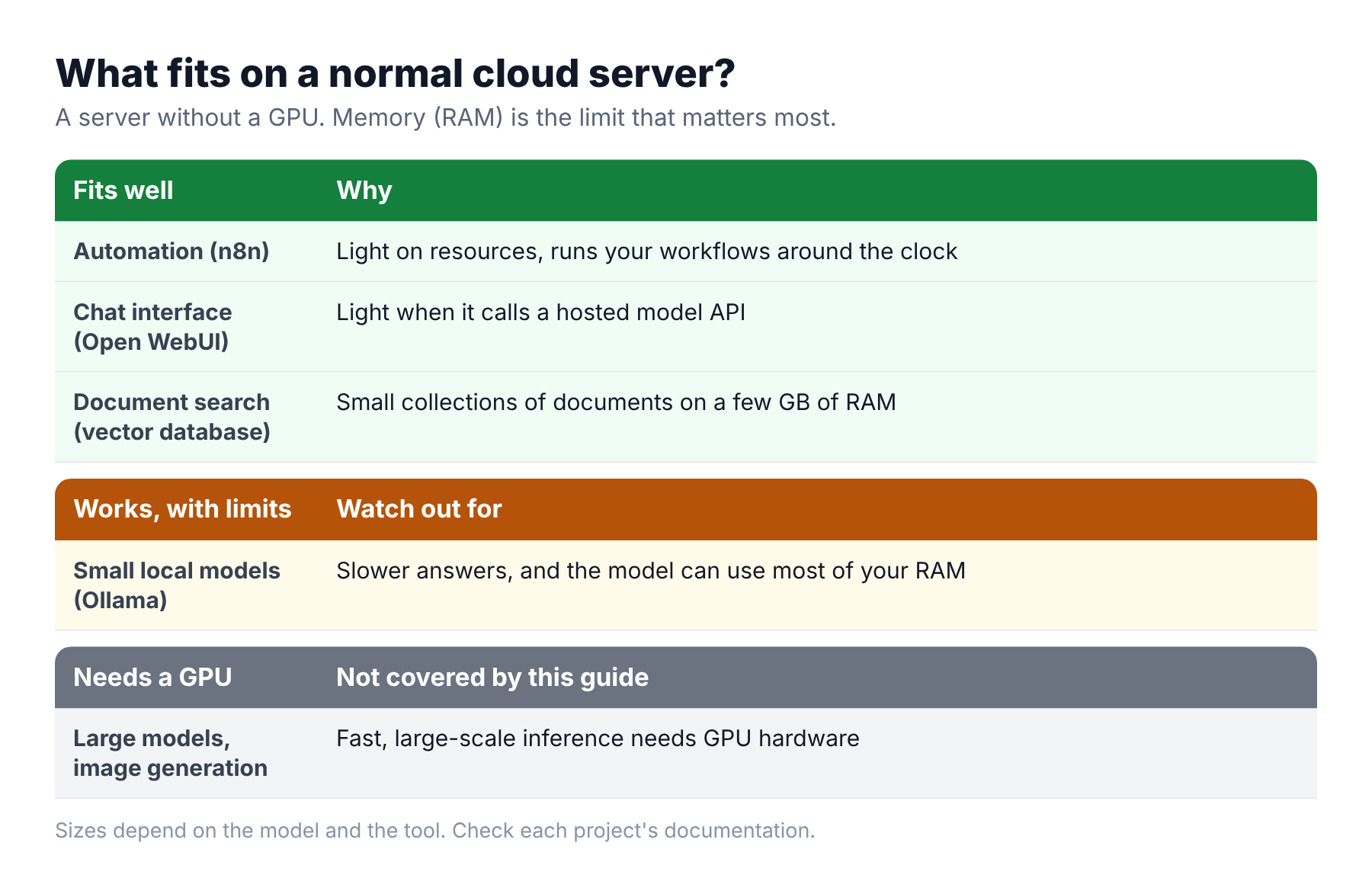
Commonly cited guidance for these tools, which depends on the model and the version, is roughly this:
- n8n, Open WebUI and similar tools are light when they use an external model API, often needing only a core or two and a couple of gigabytes of RAM.
- A vector database such as Qdrant needs a few gigabytes of RAM for small collections.
- Local models with Ollama need a lot more memory. As a rule of thumb, a small model of around 7 billion parameters in a compressed form needs about 5 GB of RAM or more, and the answers are slower without a GPU.
- Image generation and large models need GPU hardware. They are outside this guide.
Check each project's documentation for current requirements before you choose a server size.
A safe setup: only HTTPS is public
The most common mistake is leaving the AI tool open to the whole internet. Some tools, such as a local model server, have no login by default. Use this layout instead:
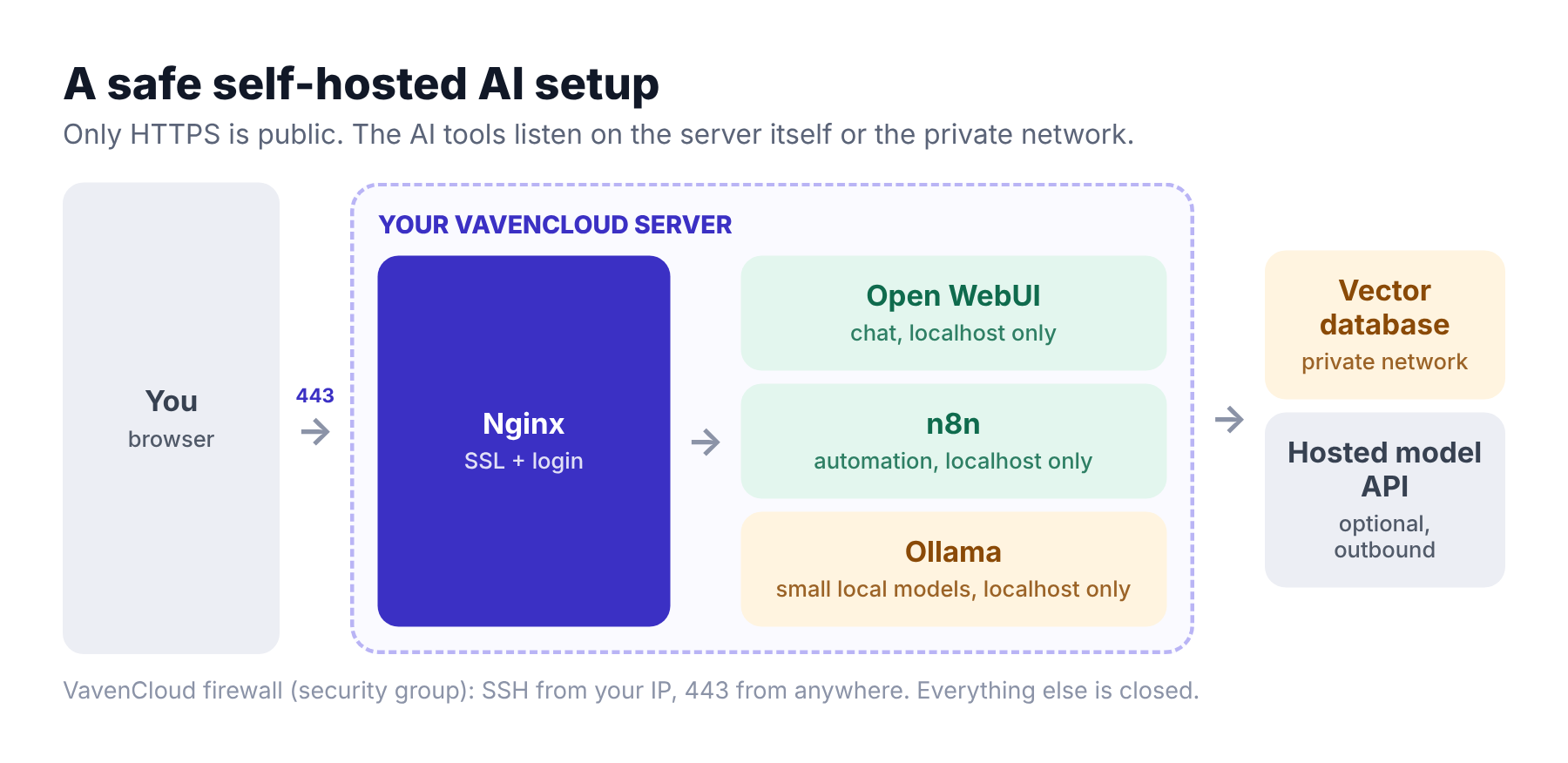
- Create the server and attach a security group that allows SSH from your IP and HTTPS (443) from anywhere, and nothing else.
- Run each tool so it listens only on the server itself (127.0.0.1), not on all addresses.
- Put Nginx in front with SSL and a login. Our guide on deploying with Nginx and free SSL shows the Nginx and Certbot steps.
- Keep databases and vector stores private, on your private network, not on a public address.
- Back up the data volumes and take a snapshot before every upgrade.
Example: Open WebUI and n8n with Docker
These two examples start each tool bound to the server itself. The -p 127.0.0.1:... part is the important bit. Image names and options change, so check each project's current documentation.
docker run -d --name open-webui \
  -p 127.0.0.1:3000:8080 \
  -v open-webui:/app/backend/data \
  --restart always \
  ghcr.io/open-webui/open-webui:main
docker volume create n8n_data
docker run -d --name n8n --restart always \
-p 127.0.0.1:5678:5678 \
-v n8n_data:/home/node/.n8n \
docker.n8n.io/n8nio/n8nThen configure Nginx to proxy to 127.0.0.1:3000 (Open WebUI) and 127.0.0.1:5678 (n8n), and add SSL. If you use a local model, install Ollama, which listens on 127.0.0.1 by default, and keep it that way. Check the n8n licence terms if you plan to use it for a business.
Right-sizing and growing
- Start with the tools that call a hosted model API. They need little memory.
- Add a small local model only when you have measured the RAM it uses.
- If the server runs out of memory, move to a larger size. On VavenCloud you can resize up from the dashboard, and the server restarts while it is resized. Downgrades go through support.
- When one server runs many tools, split them: keep the vector database or the model on its own server on your private network.
Real-life problems and how to fix them
Here are the problems people hit when they first self-host AI tools. These are common situations, not customer stories.
"Our AI chat tool was open to the internet."
What goes wrong: The tool was started on all addresses, and the firewall allowed its port. Anyone who found the address could use it, or its API.
The fix: Bind to 127.0.0.1, expose only HTTPS through Nginx with a login, and allow only the ports you need in the security group.
"Answers take a minute."
What goes wrong: A model was running on the CPU with too little memory, so it was slow.
The fix: Use a smaller model, use a hosted model API for chat, or move that workload to hardware with a GPU.
"The server crashed and the app was killed."
What goes wrong: The model and other tools used all the RAM, and the system stopped a process.
The fix: Check memory use, choose a smaller model, or resize the server to a larger plan.
"The data disappeared after an update."
What goes wrong: The container ran without a volume, so the data lived inside the container.
The fix: Use volumes, as in the examples, and schedule backups. Take a snapshot before updating.
"An API key was leaked."
What goes wrong: The key was saved in a script or a Git repository.
The fix: Keep keys in environment variables or a secrets file with strict permissions, never in Git, and rotate any key that leaked.
What this does not do
- No GPU. This guide uses a standard cloud server. Large models and image generation need GPU hardware.
- Self-hosting is not automatically private. If a tool calls an outside API, that data leaves your server.
- You run the tools. Updates, secrets and access control are your job. Our first-hour security checklist is a good start.
Frequently asked questions
Can I run AI on a VPS?
Yes, for the right workloads. Automation tools, chat interfaces that call a hosted model, and small vector databases run well. Small local models run slowly. Large models and image generation need GPU hardware.
Can I run Ollama on a VPS without a GPU?
Yes. Small, compressed models run on a CPU, but answers are slower, and the model can use most of your RAM. Measure before you commit.
How much RAM do I need for self-hosted AI?
The tools that call a hosted API often need a couple of gigabytes. A small local model needs several gigabytes more. Check the model's requirements and leave room for the system.
Is self-hosted AI private?
Your data stays on your server only if everything runs there. If a tool sends prompts to an outside API, that API receives them.
What is the best self-hosted ChatGPT alternative?
Open WebUI is a popular self-hosted chat interface that works with local models and hosted APIs. The best choice depends on your models, your team and your licence needs.
How do I keep my self-hosted AI tools secure?
Do not expose them directly. Bind them to 127.0.0.1, put HTTPS and a login in front, restrict the firewall, keep them updated, and back up the data.
Keep reading
- How to deploy a Node.js app on a VPS with Nginx, PM2 and SSL
- Firewall rules explained: ports, CIDR and security groups
- Snapshot vs backup: which one do you need?
Planning an AI setup and unsure about the server size? Open a support ticket and tell us what you are running. Our team will help you.