
Why Is Creating a Cloud Server So Complicated? (And a Simpler Way)

Short answer: creating a virtual machine (VM) on a large cloud platform is not a one-click job because every launch asks you to decide about the image, instance type, network, subnet, firewall, storage, permissions and limits. That flexibility helps large companies, but it slows down developers, startups and small DevOps teams who just need a server. A simpler cloud platform asks for fewer choices and still gives you a private network, a firewall and backups.
If you have ever lost an hour setting up one test server, you are in good company. Even experienced cloud and DevOps engineers find big cloud consoles heavy, and the pain is greater for small teams that do not have a dedicated platform engineer.
Why is creating a cloud server so complicated?
Major cloud platforms such as AWS, Azure and Google Cloud are built to serve everyone from a hobby project to a global bank. To do that, they split everything into separate services: compute, networking, storage, identity, monitoring and billing. A single VM touches most of them.
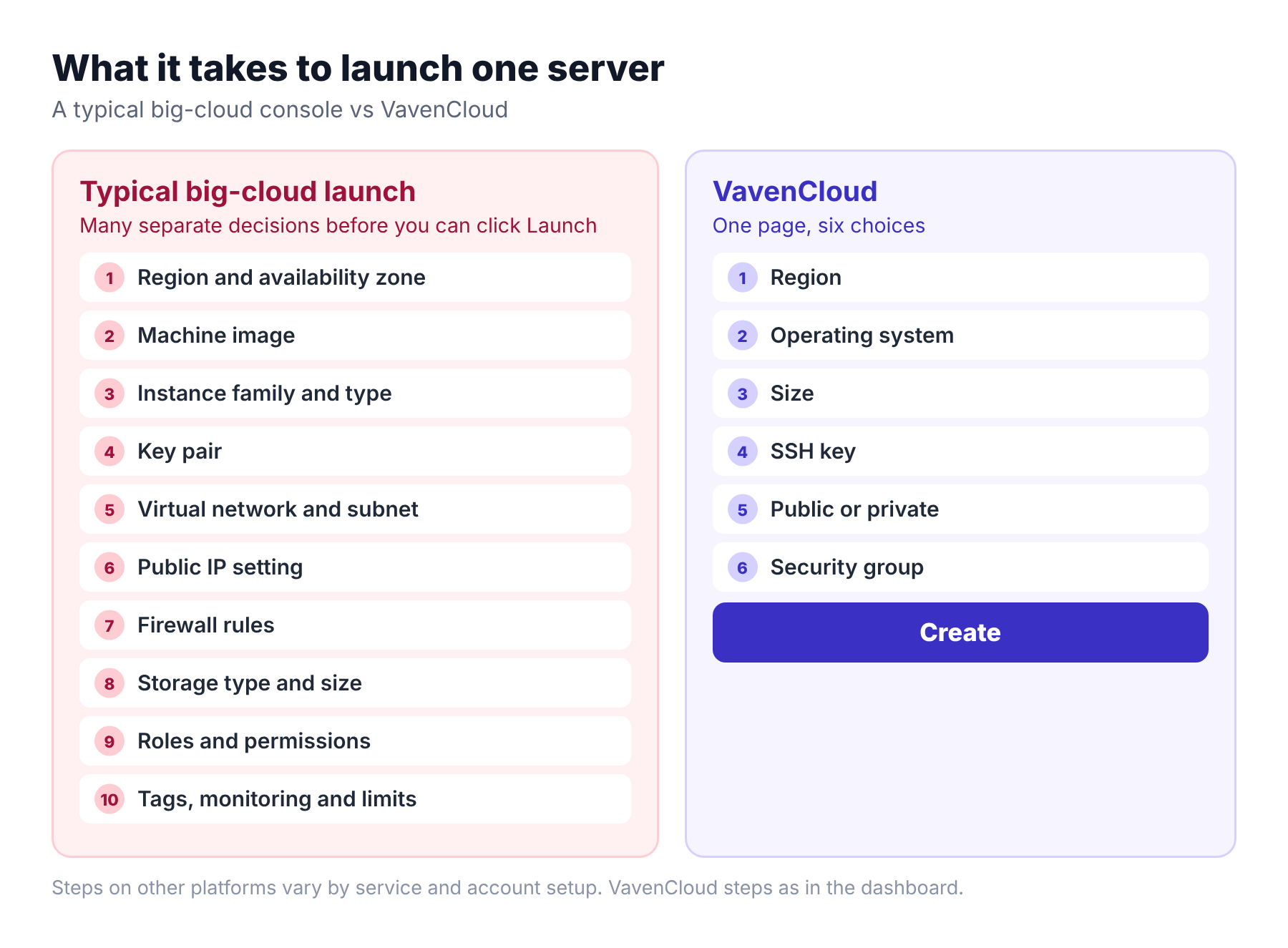
- Many services, one server. A server needs an image, a machine type, a network, an address, a firewall and a disk, and each is its own concept.
- Many options per choice. There are long lists of machine types, storage types and network settings, each with its own name and rules.
- Security by permission. Roles and policies protect your account, but they add steps and error messages.
- Billing by meter. Many small charges are easy to miss until the invoice arrives.
None of this is a design flaw. It is the price of flexibility. The problem is that you pay that price even when you only need a simple server.
Real-life problems cloud and DevOps engineers run into
These are common situations, not customer stories.
"I only needed a test server."
What happens: A developer wants one small server for an afternoon. First they need to find the right image, then pick from a long list of machine types, create a key pair, choose a virtual network and subnet, and decide what the firewall should allow.
Why it hurts: An hour passes before the first login, and most of it is spent on choices that have nothing to do with the app.
"The server is running, but I can't connect."
What happens: The firewall rules did not allow SSH from the engineer's IP, or the subnet had no route to the internet.
Why it hurts: The cause is spread across three or four screens, so finding it takes longer than creating the server.
"It says permission denied, but I'm the admin."
What happens: Cloud accounts use roles and policies. A missing permission on one service can block a launch that looks fine.
Why it hurts: Small teams end up reading policy documents instead of shipping.
"We hit a limit we didn't know about."
What happens: New accounts often start with quotas on servers, IP addresses or regions. The launch fails, and the error points to a limit page.
Why it hurts: Work stops until a quota request is approved.
"What is this charge?"
What happens: Storage, public IPs, snapshots and data transfer are billed separately, and a forgotten resource keeps billing.
Why it hurts: The first invoice is a surprise, and the cleanup takes a day.
"The new teammate cannot do it alone."
What happens: A junior developer or a new DevOps hire has to learn the platform's vocabulary before the first deployment.
Why it hurts: Every simple task needs a senior person's time.
What does a simpler cloud look like?
A simpler cloud keeps the parts you need and hides the parts you do not. For a typical VM, that means:
- One page for region, operating system, size and SSH key.
- Public or private networking as a single choice, with a private network created for you.
- A firewall you pick from a list, or create inline.
- Backups and snapshots in the same dashboard.
- Progress shown live, so you know what is happening.
How to create a server on VavenCloud
- Go to Compute, then Virtual Machine, then Create.
- Choose a region.
- Choose an operating system and a size.
- Pick an SSH key, or create one on the same page.
- Choose Public or Private networking. For a private server, you can turn on the optional NAT gateway.
- Add auto-backup if you want it, and pick or create a security group.
- Click Create.
- Watch the progress: Validating configuration, Provisioning VM, Instance ready.
That is one page, and the server is usually ready within minutes. The same dashboard has Start, Stop, Reboot, resize, extra disks, firewall, snapshots and backups.
What simple does not mean
We want to be clear about the trade-offs.
- Fewer options. A simple platform has fewer instance types and fewer knobs than a hyperscaler. If you need highly specialised hardware or hundreds of managed services, a larger cloud may suit you better.
- Some features are not self-service yet. On VavenCloud, you cannot import your own SSH key, there is no console access from the dashboard, and downgrading a server goes through support.
- You still run the server. Updates, app security and access are your job. Our guide to securing a new VPS covers the first hour.
Is a simpler cloud right for you?
| A simpler cloud fits if... | A large cloud fits if... |
|---|---|
| You need servers, a private network, firewalls, load balancers and databases | You need a very wide catalogue of managed services |
| Your team is small or has no dedicated platform engineer | You have a platform team and strict compliance programs |
| You want predictable steps and a short learning curve | You need specialised hardware or global edge regions |
The simple way: VavenCloud
VavenCloud is a self-service cloud platform built so that creating a server is a page and a click, not a project. You choose the region, operating system and size, pick an SSH key and a firewall group, and click Create. A private network, load balancers, managed MySQL and PostgreSQL databases, snapshots and backups live in the same dashboard, and a support ticket reaches a real team when you get stuck.
Frequently asked questions
Why is it so hard to create a VM on AWS?
Because a VM touches many separate services, and each one asks for a decision. For a first-time user, the number of choices is the hard part, not any single step.
What is the easiest way to launch a cloud server?
Use a platform that puts the essentials on one page: region, operating system, size, SSH key and firewall. That is how VavenCloud's Create page works.
What is a good AWS alternative for small teams?
A simpler cloud platform that covers servers, private networking, firewalls, load balancers, databases and backups. Compare how many steps it takes to launch a server, and how you reach support.
Can a simple cloud handle production workloads?
It can, if it provides what production needs: a firewall, a private network, backups, and a load balancer with failover. Check each of these, and read the limits.
Do I need DevOps experience to use VavenCloud?
You do not need it to create and manage servers from the dashboard. You do need basic Linux knowledge to run your app inside the server.
Keep reading
- How to secure a new VPS: a first-hour checklist
- What to check before buying a VPS in India
- Why websites crash during traffic spikes
Want help moving from a bigger cloud? Open a support ticket and tell us what you are running. Our team will help you plan it.